
RSVP deadlines
By default, families can RSVP for an event up until it starts. You can narrow that window per event.
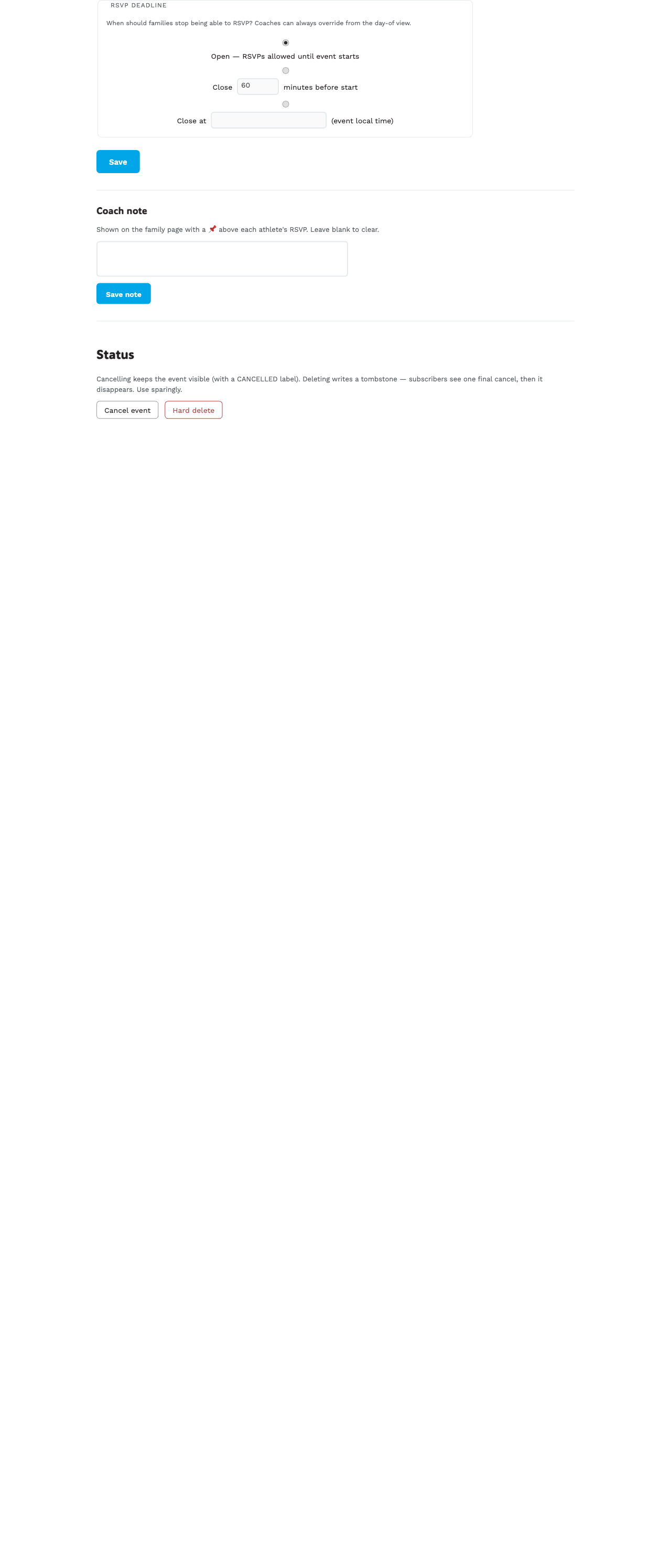
Three modes
Pick one from the RSVP deadline section on the new/edit event form:
| Mode | Behavior |
|---|---|
| Open | RSVPs allowed until the event starts. Most older events are set this way. |
| Close N minutes/hours/days before start | Cutoff is a relative offset — an amount plus a unit. Useful when the time changes, because the deadline moves with it. |
| Close at … | Cutoff is a fixed date and time, in the event’s local time zone. |
New events arrive set to 1 hour before the start. It is a default on the form, not a rule: change it per event, or in bulk, whenever it does not suit.
Picking the unit
Type the number, then pick the unit beside it. A two-day deadline for a race is “2” and “days” — not 2,880 minutes.
It’s stored in minutes underneath, and shown back to you in the largest unit that fits exactly. Save “2 days” and it reads “2 days” when you come back, not “2880 minutes”.
What happens after the cutoff
On the family page, for that event:
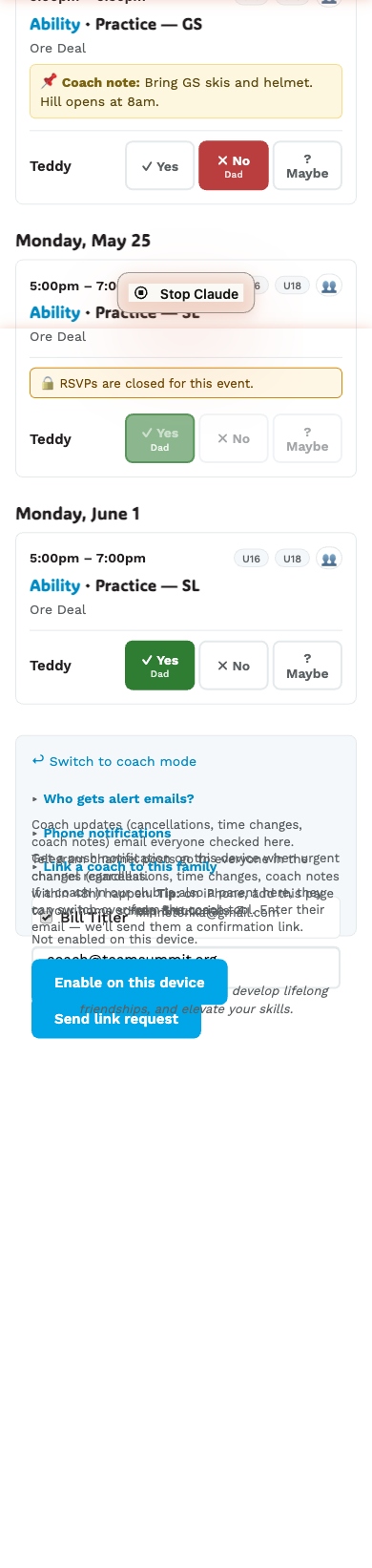
- The Yes / No buttons render disabled with a ”🔒 RSVPs are closed for this event” note above them.
- Existing RSVPs are still visible (locked in).
- A family trying to POST anyway gets a 400 error from the server.
Coaches can always override
Your /coach/today attendance chips keep working after the deadline.
The coach-side endpoint deliberately bypasses the cutoff so you can
mark someone present at the last second when they show up unexpectedly.
When the close time uses event tz
The deadline is interpreted in the event’s tz (typically the
club’s America/Denver). The DST-correct conversion is done
server-side, so a 7am-the-morning-of cutoff really means 7am Mountain
even if it’s 6am Pacific.
Automatic reminders are scheduled
Setting a deadline does more than gate the buttons — it schedules two push reminders to families with no RSVP yet:
| When | Message |
|---|---|
| 24 hours before close | ”RSVPs close in 24 hours: {event}“ |
| 1 hour before close | ”RSVPs close in 1 hour: {event}” |
Only families with at least one athlete in the event’s groups who haven’t RSVP’d are pushed. The pushes go through the same queue as other notifications, so families who have push enabled receive them on their phone like any other update. Families that have already responded get nothing — no spam.
Reminders are durable: even if the worker restarts or a deploy happens, the schedule keeps. They cancel themselves naturally once everyone has RSVP’d.
If you cancel the event, the reminder also skips — when each reminder wakes up, it re-checks the event’s status and aborts if the event has been cancelled or deleted. So if a Sunday practice is cancelled Saturday night, families won’t get a “RSVPs close in 1 hour” buzz at midnight.
Series + bulk creation also schedule reminders. When you set an RSVP deadline in the series defaults, every occurrence created from the series gets its own reminder schedule, anchored to that occurrence’s own deadline.
Adding a deadline to an existing event also works. If you edit
an event that originally had Open and switch it to a
60 minutes before start deadline, the reminders are scheduled at
that moment — no need to delete and recreate the event.
Bulk-update also schedules. From /coach/events filter rail →
select N events → Bulk edit → set RSVP deadline fields and save.
Each affected event gets its own reminder schedule. Useful for
applying “close 60 minutes before start” to a whole season’s
practices in one shot. The bulk path doesn’t fire family
notifications about the deadline change itself (it’s a “description”
change — banner-only).
Changing an existing deadline re-anchors the reminders automatically.
If reminders are already scheduled and you edit the event to shift the
lead-minutes or absolute close time (or you move start_local on a
“close N minutes before start” event), a fresh reminder schedule is
created and the old one self-cancels at fire time. So you can edit the
deadline as many times as you want; only the most recent schedule
actually pushes.
Tip: use “60 minutes before start” for most cases
Most coaches want some buffer to plan around the actual attendance, so “close 60 minutes before start” is a good default. It also nudges families to RSVP early, and the auto-reminders above give them a 24-hour heads-up + a 1-hour last call.