
Marking attendance
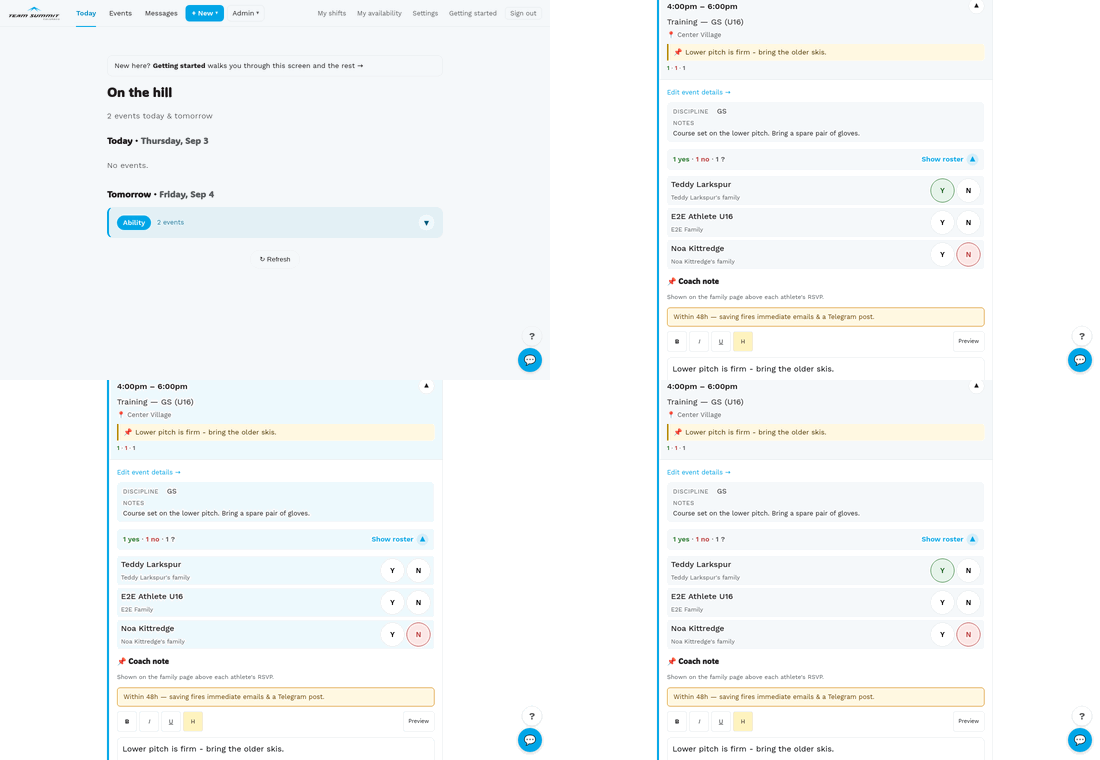
Inside an expanded event card on /coach/today, every athlete in the
event’s groups shows up with two chips: Y · N. (Maybe was retired —
see below.)

How to mark
- Tap Y to mark the athlete as attending.
- Tap N for not attending.
- Tap the same chip again to clear it back to ”?” (no response).
The chip flips colors immediately — that’s optimistic UI. The save happens in the background. If the network fails, the change keeps showing on your screen and queues; it syncs automatically when you’re back online (see Working offline).
If the server refuses the change, it does not queue — the chip goes back to what it was and a red message says so. Only a lost connection is worth retrying.
Counts at a glance
The top of the attendance section shows running totals: 9 yes · 2 no · 3 ?. These update live as you tap.
There is no Maybe, deliberately. A maybe is a headcount you cannot
act on. Athletes who have not answered show as ?, which says the same
thing honestly.
Coach overrides parent RSVPs
When a parent has already RSVPed, their chip is shown in the active color. Tapping it as a coach overrides their choice. The change is attributed to you in the audit log; the family page shows “via coach” on the resulting status.
RSVP deadlines don’t apply to coaches
If the event has an RSVP cutoff configured (see RSVP deadlines), parents can’t change their own answer after the deadline — but coaches always can. The lock-out only affects family-page submissions.
Bulk actions
There is no “mark all yes” button. If everyone showed up, tap each Y in turn — quickest with your thumb, scrolling down the list.