
Daily morning brief
The daily brief is a single push notification per coach per day that summarizes the day’s events.
Setup
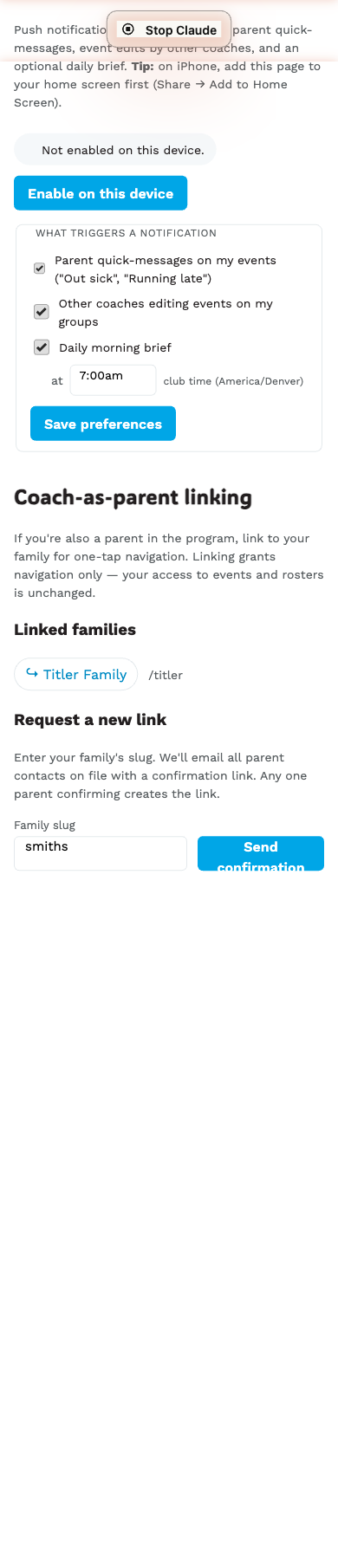
- Enable phone push first (see Enable phone push).
- In /coach/settings → Phone notifications, tick Daily morning brief.
- Pick the time from the dropdown — 5-minute increments, 24-hour day. Club’s local timezone (America/Denver).
- Save preferences.
What you’ll get
Today: 3 events5:00pm Ability Training GS · 5:30pm Age Class Training GS · 7:00pm Ability Race SLTapping the notification opens /coach/today so you can dig into any of them.
When it fires
At the time you set, in club time. A per-coach background workflow sleeps until exactly that minute, so a 7:00am brief arrives at 7:00am.
What it filters by
The brief lists only events:
- On a date in the current club-tz day.
- On a calendar you’re subscribed to (see Subscribe / mute calendars).
- That you have group access to (admin → all club events, editor → coach_group set).
On no-event days
If you have zero events today (or none on your subscribed calendars), the brief is suppressed. No noisy “Today: 0 events” buzz.
Stopping the brief
Uncheck Daily morning brief in settings and save. The next morning, no push fires.
Brief and time-zone changes
If the club’s default_tz changes (rare — would be a major operations
shift), the brief still uses your stored HH:MM but interpreted in the
new tz. So a 7:00 brief in Mountain time becomes 7:00 in whatever new
tz the club has set, not “the same UTC instant.”